1
2
3
4
5
6
|
Get-WmiObject -namespace "root\mscluster" -class MSCluster_Resource

Get-WmiObject : Invalid namespace

mofcomp C:\Windows\System32\wbem\ClusWMI.mof
|
PS C:\Windows\system32> mofcomp C:\Windows\System32\wbem\ClusWMI.mof
Microsoft (R) MOF Compiler Version 6.2.9200.16398
Copyright (c) Microsoft Corp. 1997-2006. All rights reserved.
Parsing MOF file: C:\Windows\System32\wbem\ClusWMI.mof
MOF file has been successfully parsed
Storing data in the repository…
Done!
Here is for SQL Server WMI issue.
Expected error message when WMI doesn’t registered properly.
1
2
3
4
5
6
7
|
The following exception occurred while trying to enumerate the collection: "An exception occurred in SMO while trying to manage a service.".
At line:xx char:xxx
+ $wmi.xxxx
+ ~~~~~~~~~~~~~~~~~~~~
 + CategoryInfo : NotSpecified: (:) [], ExtendedTypeSystemException
 + FullyQualifiedErrorId : ExceptionInGetEnumerator
|
Another error message when open SQL configuration manage.
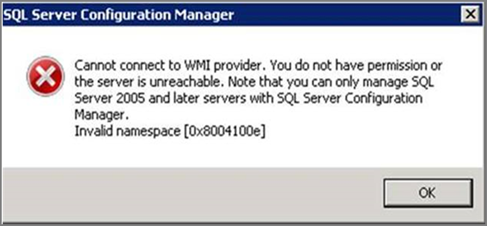
Cannot connect to WMI provider. You do not have permission or the server is unreachable
Please check path and Version number in below script.
 1
 2
 3
 4
 5
 6
 7
 8
 9
10
11
|
//SQL 2008
mofcomp "%programfiles(x86)%\Microsoft SQL Server\100\Shared\sqlmgmproviderxpsp2up.mof"
//SQL 2012
mofcomp "%programfiles(x86)%\Microsoft SQL Server\110\Shared\sqlmgmproviderxpsp2up.mof"
//SQL 2014
mofcomp "%programfiles(x86)%\Microsoft SQL Server\120\Shared\sqlmgmproviderxpsp2up.mof"
//SQL 2016
mofcomp "%programfiles(x86)%\Microsoft SQL Server\130\Shared\sqlmgmproviderxpsp2up.mof"
//SQL 2017
mofcomp "%programfiles(x86)%\Microsoft SQL Server\140\Shared\sqlmgmproviderxpsp2up.mof"
|