Log file Shrink has several dependency.
Log backup(or Checkpoint in simple recovery mode)
Replication
Mirroring
4. VLF
#1,2,3 can be check by this script
| |
So, most case, it’s ok. But, only #4 can’t be checked by above script.
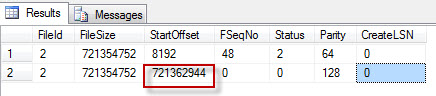
Please use this file to be able to check “StartOffset” for second VLF since LDF required minimum 2 VLFs.
DBCC LOGINFO
If it’s too big, need to refresh VLF.
But, unfortunately, refresh VLF isn’t simple.
Transaction Log VLFs – too many or too few?
http://technet.microsoft.com/en-us/library/aa933049%28v=sql.80%29.aspx
High Virtual Log File (VLF) Count
The effect of VLF size on shrinking the log.
Ref. Log_reuse_wait (http://msdn.microsoft.com/en-us/library/ms178534.aspx) 0 = Nothing 1 = Checkpoint 2 = Log backup 3 = Active backup or restore 4 = Active transaction 5 = Database mirroring 6 = Replication 7 = Database snapshot creation 8 = Log Scan 9 = An AlwaysOn Availability Groups secondary replica is applying transaction log records of this database to a corresponding secondary database. 10 = For internal use only 11 = For internal use only 12 = For internal use only 13 = Oldest page 14 = Other (transient)